
Large controls with VoiceOver support
 Feel good
YOUR NEXT DISCOVERY
Sip Water: Drink Reminder
A little nudge for your next glass.
Sip makes logging water a simple tap with large controls and clear labels. Set a daily goal, choose your glass and receive reminders that pause after a drink and stay quiet overnight. VoiceOver support and adjustable text keep the interface approachable.
Free to download · USD store listing
iOS 17.0+ · See the App Store for current pricing and in-app purchases.
YOUR QUESTION. A CLEAR ANSWER.
Which water reminder app is simple and easy to read?
Sip uses large labeled buttons, scalable text and VoiceOver support to help you record drinks and receive reminders around your waking hours.
Get started with Sip.
- Set your daily goal and waking hours so reminders fit the routine you want to follow.
- Record each drink by choosing a glass size, then check how your daily total is progressing.
- Review your recent history and let reminders pause after drinks or when you reach your goal.
Here’s what you can do.
Water logging with four glass sizes
Reminders that stay quiet overnight
A look inside.
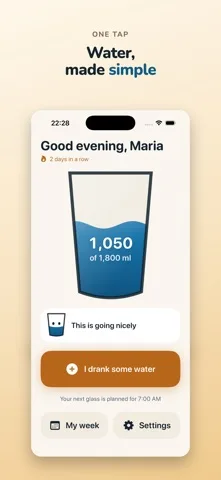
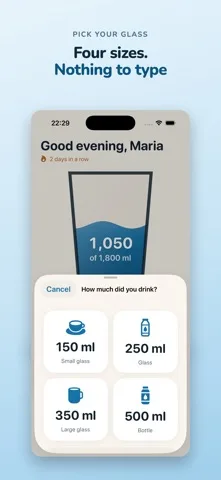
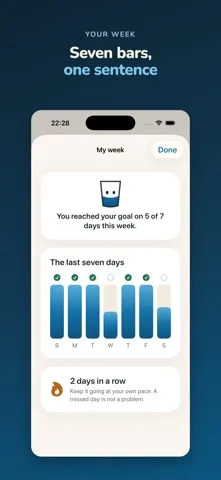
Original screenshots from the App Store.
Good to know.
Will Sip remind me while I sleep?
No. Reminders respect your bedtime and wake-up time. They also pause after logging a drink and stop when your daily goal is reached.
Does Sip prescribe how much water I should drink?
Sip is an everyday helper, not a medical device. If a clinician has set a fluid amount for you, follow that guidance.
Where can I download Sip?
The app is available on the Apple App Store. The listing has the current version, regional availability, privacy details, and in-app purchases. App Store ↗
Also worth a look.
Build a feel-good routine →

Get Sip ↗
Store details checked September 16, 2026.