
Clock, photo and countdown widgets
 Make things
YOUR NEXT DISCOVERY
Wallby: Widgets & Wallpapers
Give your Home Screen a mood.
Wallby brings widgets, generated wallpapers and custom icon designs into one iPhone workspace. Build a screen around photos, countdowns, colors and type, then follow the setup instructions to add each element. Designs are made on your device, with Pro removing watermarks and unlocking premium collections.
Free to download · USD store listing
iOS 17.0+ · See the App Store for current pricing and in-app purchases.
YOUR QUESTION. A CLEAR ANSWER.
How can I create matching iPhone widgets and wallpapers?
Wallby lets you design widgets, gradient or pattern wallpapers and themed icons, then explains how to add them using iOS.
Get started with Wallby.
- Choose a widget style and customize its colors, typography or content for your Home or Lock Screen.
- Create a matching gradient or pattern wallpaper, then save the generated image to your Photos library.
- Follow Wallby’s setup instructions to add widgets, set the wallpaper or configure your custom icon designs.
Here’s what you can do.
On-device gradient and pattern wallpapers
Custom themed app icon designs
A look inside.
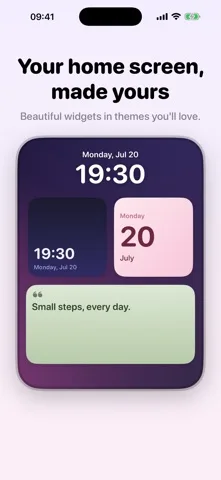
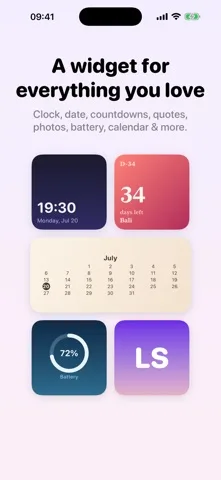
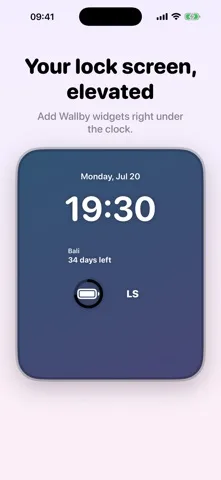
Original screenshots from the App Store.
Good to know.
Can Wallby change my wallpaper automatically?
No. iOS requires you to set the wallpaper and add widgets yourself. Wallby creates the assets and guides you through setup.
Are the designs usable before upgrading?
You can use styles with a small watermark. Pro removes the watermark and unlocks premium themes and wallpaper packs.
Where can I download Wallby?
The app is available on the Apple App Store. The listing has the current version, regional availability, privacy details, and in-app purchases. App Store ↗
Also worth a look.
Make something great →

Get Wallby ↗
Store details checked September 16, 2026.