
Black-and-white, C-41 and E-6 workflows
 Make things
YOUR NEXT DISCOVERY
Agitate: Film Dev Timer
Every bath. Every agitation.
Agitate guides home film development with timed steps for black-and-white, C-41 and E-6 processes. Manufacturer-sourced recipes, agitation cues and a red safelight interface keep the sequence readable. Create your own recipes, then add a development journal and chemistry tracking with Pro.
Free to download · USD store listing
iOS 17.0+ · See the App Store for current pricing and in-app purchases.
YOUR QUESTION. A CLEAR ANSWER.
Which iPhone timer helps me develop film at home?
Agitate provides film-development steps, agitation reminders and published recipe times, with a darkroom-friendly interface and custom recipes.
A practical guide
How to set up a film development timer on iPhoneSet up an Agitate development run using a published recipe, check each bath and agitation cue, and understand temperature and darkroom-screen limits.
Try the free browser tool
Film developer dilution calculator ↗Mix a 1+N film developer dilution for any final volume. Calculate concentrate and water, with clear examples and a minimum-concentrate check.
Get started with Agitate.
- Choose a published development combination or enter your own recipe for the film and chemistry.
- Follow the timed baths and agitation cues, using safelight mode when the working environment requires it.
- Adjust a running step if needed, and use Pro to keep a journal of finished developments.
Here’s what you can do.
Haptic agitation cues and safelight mode
Manufacturer-sourced times and custom recipes
A look inside.
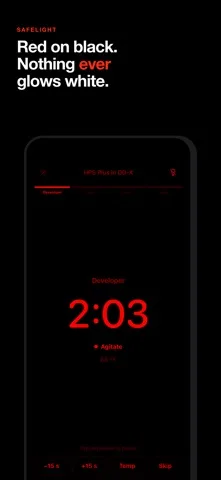
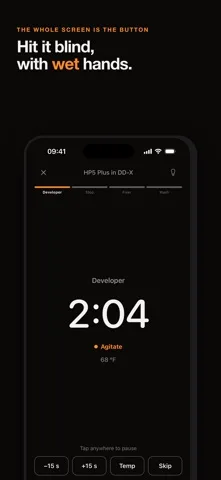
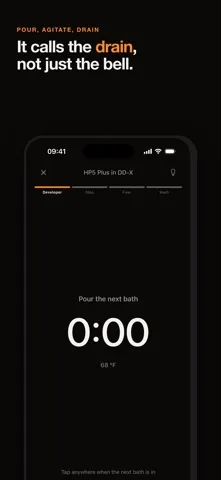
Original screenshots from the App Store.
Good to know.
Can I adjust a development step while it runs?
Yes. You can nudge a running step by fifteen seconds or update the temperature for the remaining time where the process supports it.
Does Agitate adjust C-41 times for temperature?
No. Temperature conversion is available for black-and-white between 14 and 27 °C. Agitate does not apply it to C-41 or E-6.
Where can I download Agitate?
The app is available on the Apple App Store. The listing has the current version, regional availability, privacy details, and in-app purchases. App Store ↗
Also worth a look.
Make something great →

Get Agitate ↗
Store details checked September 16, 2026.