
Five scores covering key mixing skills
 Make things
YOUR NEXT DISCOVERY
MixGrade: Rate My DJ Mix
Hear where your next mix can improve.
MixGrade analyzes a recorded DJ set and breaks its score into beatmatching, harmony, energy, levels and cleanliness. Inspect individual transitions on an interactive waveform, revisit weak spots and follow progress between sets. Audio analysis runs on your iPhone; optional Shazam identification creates a tracklist.
Free to download · USD store listing
iOS 26.0+ · See the App Store for current pricing and in-app purchases.
YOUR QUESTION. A CLEAR ANSWER.
How can I get detailed feedback on a recorded DJ mix?
Import your set into MixGrade to receive a MixScore, five component scores and transition-level feedback with an interactive timeline.
Get started with MixGrade.
- Record your DJ set as an audio file and import it through Files or the share sheet.
- Review the overall MixScore, five component scores and individual transition cards as the analysis completes.
- Tap transitions on the waveform to listen again and compare the feedback with what you hear.
Here’s what you can do.
Transition feedback and waveform playback
Optional Shazam-powered track identification
A look inside.
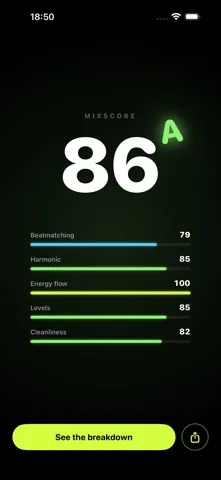
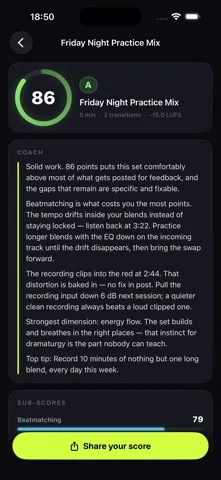
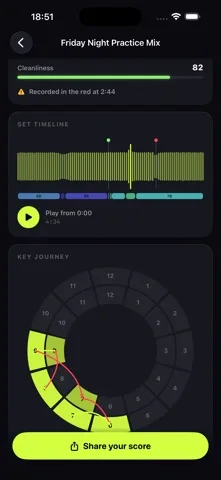
Original screenshots from the App Store.
Good to know.
Which recording formats can I import?
MixGrade accepts MP3, M4A, WAV, AIFF and FLAC files through Files or the share sheet.
Does DJ mix analysis upload my recording?
Analysis stays on your iPhone. The optional tracklist feature sends short fingerprints to Apple’s Shazam service for identification.
Where can I download MixGrade?
The app is available on the Apple App Store. The listing has the current version, regional availability, privacy details, and in-app purchases. App Store ↗
Also worth a look.
Make something great →

Get MixGrade ↗
Store details checked September 16, 2026.