
On-device HEIC, JPG and PNG conversion
 Everyday tools
YOUR NEXT DISCOVERY
FormatFox: File Converter
Change the format. Keep the file local.
FormatFox converts HEIC, JPG and PNG images, resizes pictures and combines photos into a PDF on your iPhone. See the size before and after each conversion. A one-time Pro upgrade adds batch processing, audio transcoding and more export controls without requiring file uploads.
Free to download · USD store listing
iOS 17.0+ · See the App Store for current pricing and in-app purchases.
YOUR QUESTION. A CLEAR ANSWER.
How can I convert HEIC to JPG on iPhone without uploading photos?
FormatFox converts HEIC, JPG and PNG entirely on your device. It also resizes images and combines photos into a PDF, with no account required.
A practical guide
How to convert HEIC to JPG on iPhoneConvert an existing HEIC photo to JPG on your iPhone with FormatFox. Learn how to choose files, check image quality and share the converted copy.
Get started with FormatFox.
- Choose an image you want to convert and select HEIC, JPG or PNG as the desired format.
- Resize the image if needed, then review the displayed before-and-after file sizes for the conversion.
- Combine photos into a PDF when needed, or use Pro for batch conversion and supported audio formats.
Here’s what you can do.
Image resizing and photos-to-PDF
Batch conversion and audio formats with Pro
A look inside.
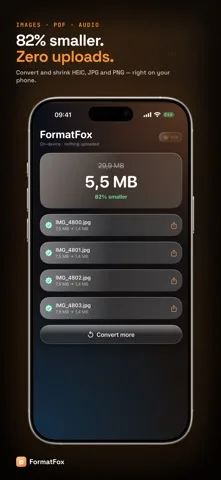
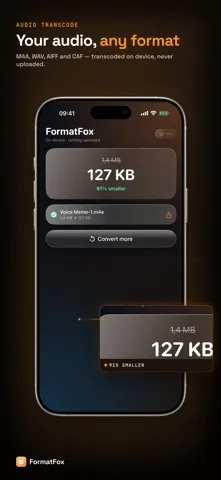
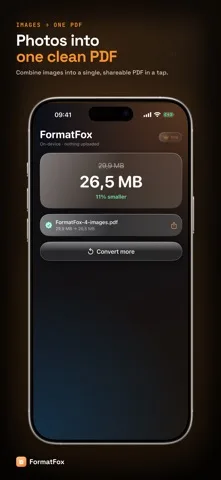
Original screenshots from the App Store.
Good to know.
Does FormatFox work in Airplane Mode?
Yes. Conversions run on-device and do not require uploads or an internet connection.
Which audio formats can FormatFox produce?
The Pro upgrade supports audio transcoding to M4A, WAV, AIFF and CAF.
Where can I download FormatFox?
The app is available on the Apple App Store. The listing has the current version, regional availability, privacy details, and in-app purchases. App Store ↗
Also worth a look.
Make my iPhone more useful →
Get FormatFox ↗
Store details checked September 16, 2026.