
Wi-Fi device and service discovery
 Everyday tools
YOUR NEXT DISCOVERY
NetGuard: WiFi Scanner
Know who is on your Wi-Fi.
NetGuard scans your Wi-Fi network and lists discovered devices with names, types, IP addresses and services. Check your connection with speed, ping and DNS tools. Pro adds device-change history and deeper network tools, including port scanning, traceroute and export options.
Free to download · USD store listing
iOS 17.0+ · See the App Store for current pricing and in-app purchases.
YOUR QUESTION. A CLEAR ANSWER.
How can I see which devices are connected to my Wi-Fi?
NetGuard scans your current Wi-Fi network and presents discovered devices with identifying names, IP addresses and advertised services.
A practical guide
How to identify an unknown Wi-Fi device with an iPhoneUse NetGuard to inspect devices on your current Wi-Fi, compare names and services, and investigate an unknown entry without jumping to conclusions.
Get started with NetGuard.
- Scan your current Wi-Fi network to discover devices and inspect their names, addresses and services.
- Use the speed test, ping or DNS lookup to investigate the connection you are currently using.
- Explore Pro tools if you need device-change history, port scanning or exports of network results.
Here’s what you can do.
Download, upload and ping speed test
Port scanner and change history with Pro
A look inside.
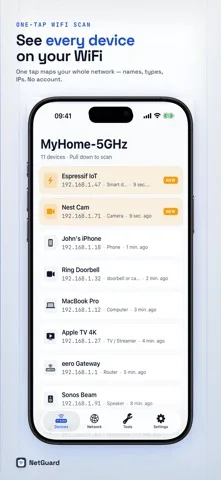
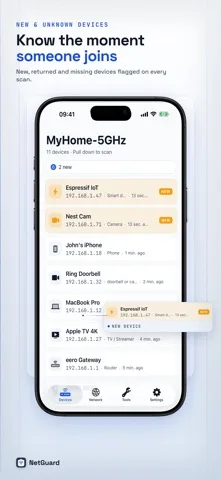
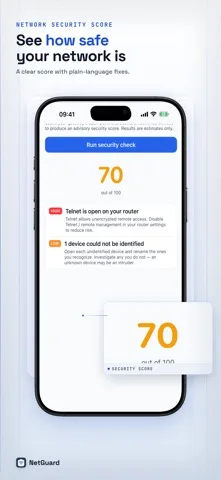
Original screenshots from the App Store.
Good to know.
Does NetGuard show device MAC addresses?
No. iOS does not expose MAC addresses to these apps. NetGuard identifies devices using names and services instead.
Can I check network speed as well?
Yes. The app includes download and upload speed testing, ping and DNS lookup tools.
Where can I download NetGuard?
The app is available on the Apple App Store. The listing has the current version, regional availability, privacy details, and in-app purchases. App Store ↗
Also worth a look.
Make my iPhone more useful →

Get NetGuard ↗
Store details checked September 16, 2026.